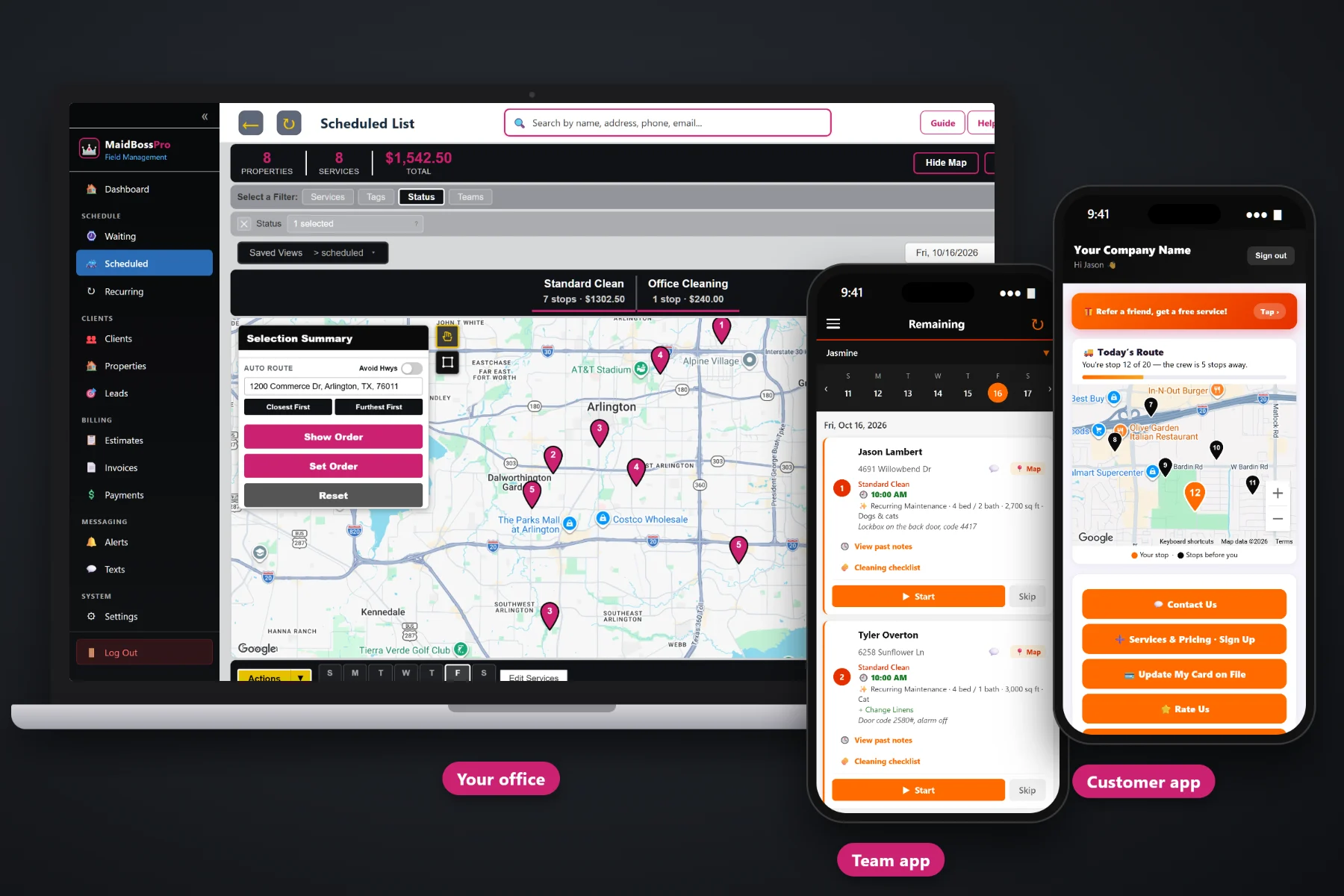
A cleaning schedule is a puzzle that changes every week: weekly homes, every-two-weeks homes, monthly homes, a deep clean squeezed in on Tuesday, a move-out that has to happen before the new tenant arrives, and a team member who calls in sick at 6:45am. MaidBossPro puts every cleaning on a dispatch board by day and by team, routes each team Closest First or Furthest First from the office, keeps every recurring home in a fixed slot — same day, same time, same team — with months of visits already on the schedule, and sends the customer an on-the-way text when the team leaves the last house.
Plans start at $59/month, and the dispatch board, teams, routing, Recurring Cleanings and the Waiting List come with every plan. Scheduling is not an add-on you buy later. To see how scheduling fits with quotes, the team app, the customer app and billing, start at MaidBossPro and then dig into the scheduling side here.
Every cleaning for the day on one board, with the cleaning type, bedrooms, bathrooms and extras under each address.
Team 1, Team 2, Team 3. Filter the board by team and see exactly what each pair has in front of them.
Closest First or Furthest First from the office, or set the route order by hand when a customer needs a certain time.
Weekly, every two weeks or monthly, each home keeps its day, time and team, with every visit for the next 3, 6 or 12 months already on the schedule.
The team app sends on-the-way and arrived texts on its own, so the office isn't calling ahead to every house.
Every team's location shows on the office map, so you know who is closest when a schedule changes mid-day.
A 2-bedroom maintenance clean and a 5-bedroom move-out are not the same stop. MaidBossPro shows the cleaning type, bedrooms, bathrooms, square feet, pets and extras under every address on the office lists, so whoever builds the schedule can balance the day instead of guessing from a street name.
Most cleaning owners build the schedule early in the morning or late at night, between everything else. MaidBossPro keeps it to a short routine: your regulars are already on the schedule in their slots, so you book the one-off work waiting on the Waiting List, give it to a team, route it, and let the phones and the texts do the rest.
Create Team 1, Team 2 and so on, add employees with personal PINs, and assign each person to a team.
Add Recurring Cleaning puts every weekly, every-two-weeks or monthly visit for the next 3, 6 or 12 months on the schedule, same day, same time, same team. Deep cleans and move-outs wait on the Waiting List as one-time jobs.
Give each job a day and a team, then auto-route Closest First or Furthest First from the office, or set the order by hand.
Each team sees its homes in route order on the phone, and customers get on-the-way and arrived texts as the day moves.
Most calendars and generic field-service tools treat every appointment as a block of time with an address. A cleaning schedule needs to know how big the home is, what extras were booked, which team usually goes there, and when the next visit is.
Ask a cleaning company owner how the schedule really gets built and you will hear about a color-coded spreadsheet, a paper planner, and a group text where the lockbox codes live. You will hear about the Tuesday a team drove across town twice, the every-two-weeks customer who got skipped because nobody remembered her, and the move-out that was booked on the same morning as five recurring homes for one team.
The schedule should remember each home's day, time and team, show how big each job is, and put it in an order that makes sense on the road. When it does, the owner stops being the only person who can build the week.
MaidBossPro keeps the home, the cleaning details, the team and the customer in one place, from the first estimate to the paid invoice.
Every tool here exists to get the right team to the right home on the right day, with less driving and fewer phone calls.
The Scheduled List shows every cleaning by day, with the cleaning details under each address.
Each team is set up like a vehicle, Team 1, Team 2, and employees are assigned to a team.
Show one team's homes for the day and check the load before anyone leaves the office.
Closest First or Furthest First from the office puts a team's homes in a driving order in one click.
Move a fixed-time customer to the top or the end, and the team's phone follows the same order.
Weekly, every 2 weeks, every 4 weeks or monthly on the same date, in a fixed slot. Change, Extend 6 months or Stop a series.
Every one-off job waiting to be booked, from deep cleans to move-outs and approved estimates, on a live map.
Deep cleans, move-in / move-out and post-construction cleans scheduled between recurring homes.
Type, bedrooms, bathrooms, square feet, pets and extras under every address on the board.
Lockbox, key, door code and alarm notes on the card, so no one calls the office from the porch.
Sent from the team app automatically. Customers choose night before, when they're next and when the team arrives.
In the customer app: "You're stop 12 of 20 — the crew is 5 stops away."
Team locations on the office map, so you know who can cover a last-minute change.
Save the board the way you like to look at it and come back to it every morning.
Print a team's route when someone wants paper on the clipboard too.
Start $59, Pro $89 and Crew $199 per month, with scheduling on every plan.
The week starts with your regulars already in place. Weekly, every-two-weeks and monthly homes sit on the schedule in their fixed slots, with the time on each card, because Add Recurring Cleaning put months of visits there ahead of time. One-time deep cleans and move-outs wait on the Waiting List until they are booked. The office gives each one-off job a day and a team, routes it, and the team's phone shows the same order. When a team taps Complete, the office sees the job done and the invoice created. For the full walkthrough, read Cleaning Scheduling Software: The Complete Guide for House Cleaning and Maid Service Companies.
A cleaning customer wants to know two things: which day, and roughly when. MaidBossPro sends a reminder the night before, an on-the-way text when the team heads over, and an arrived text when they pull up. The customer app shows a live map with their place in the team's day. Replies come back to the office through two-way texting, and when the clean is complete, the invoice, card on file and online payment are all in the customer app.
Pick the plan that fits your company. Every plan starts with a 14-day free trial and no credit card.
Compare plans on the pricing page.
Each recurring client keeps a fixed slot: the same day, the same time and the same team. On Recurring Cleanings you click Add Recurring Cleaning, pick the home, the service and price, the frequency (weekly, every 2 weeks, every 4 weeks or monthly on the same date), the first date, the time and the team, and choose 3, 6 or 12 months. Every visit goes straight onto the schedule and that team's phone. Change, Extend 6 months or Stop a series from the list, and move or skip a single visit from the schedule.
Yes. Every recurring series has its own team, so a home that Team 2 cleans every other Thursday keeps going to Team 2. Filtering the board by team makes it easy to check that each team has its usual homes before the day starts.
Pick a team and a day, then choose Closest First or Furthest First from the office. The homes are put in driving order, and you can still move a stop by hand when a customer needs the team at a certain time. The team's phone shows the same order.
Filter the board by team, look at who is closest on the office map, and move homes to another team or another day. The team app updates with the new list, and the on-the-way texts still go out from whichever team ends up going.
Customers choose their alerts: a reminder the night before, a text when they are next, and a text when the team arrives. The customer app also shows a live map with their place in the team's day, like "You're stop 12 of 20."
Start is $59/month, Pro is $89/month, and Crew is $199/month. Scheduling, teams and routing are on every plan, and every plan starts with a 14-day free trial with no credit card.
Scheduling is one piece of how MaidBossPro runs a cleaning company. For quotes, the team app, the customer app, monthly account billing and payments, see the full MaidBossPro platform overview.
Practical reading on the dispatch board, setting up teams, auto-routing, recurring rhythms, fitting in deep cleans and move-outs, customer texts, team GPS, the Waiting List, holidays, skips, sick days and building the daily schedule.
A dispatch board by team and day, auto-routing, recurring homes in fixed slots scheduled months ahead, and customer texts that go out without you. Try MaidBossPro free for 14 days.